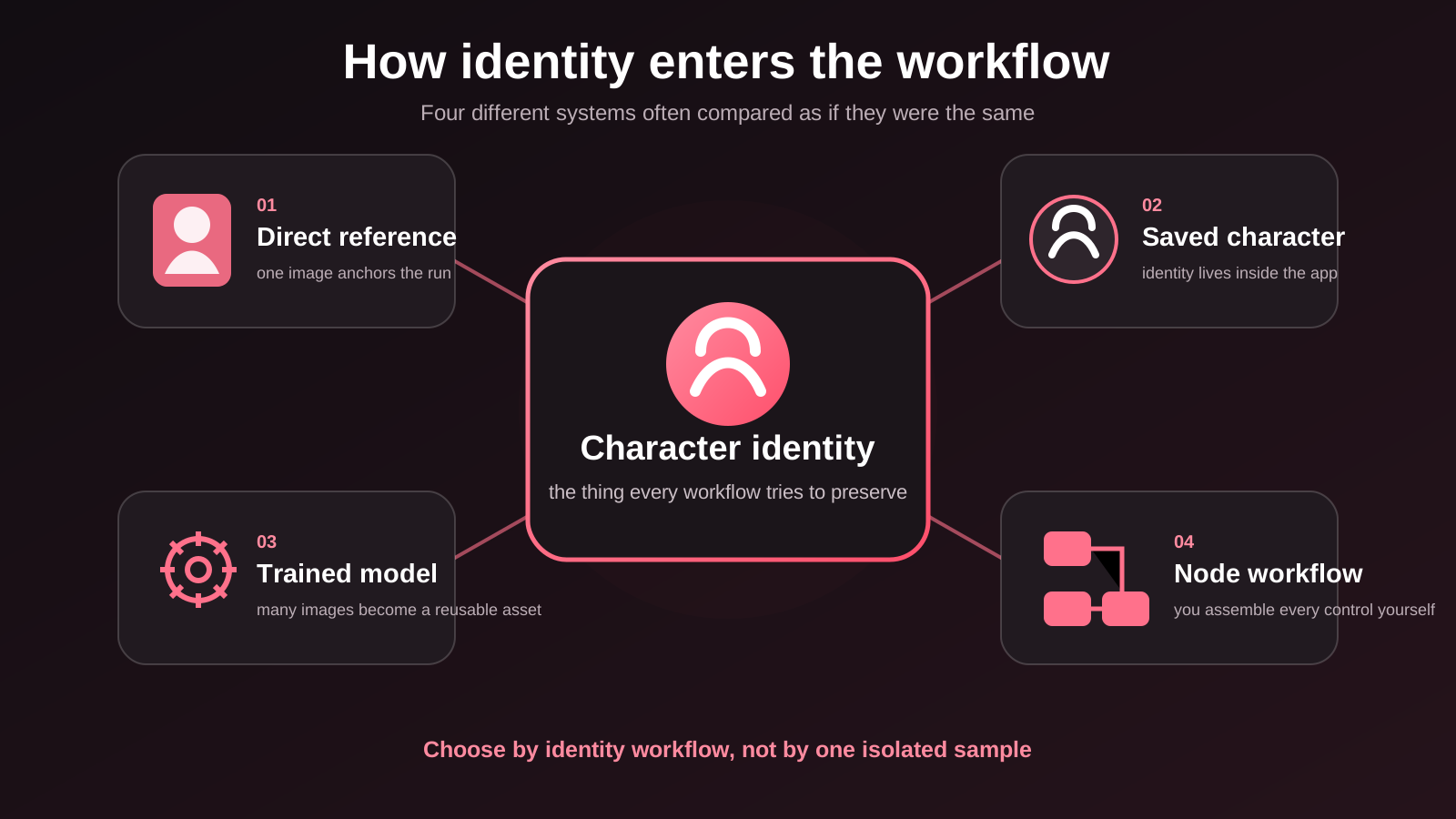
The best NSFW AI art generator by reference is not simply the one that makes the prettiest isolated image. It is the one whose workflow matches how you want to keep a character recognizable: a direct reference, an in-app character, a trained model, or a node-based image-to-image setup.
The short answer
Choose Gensomnia when you want to start from a fictional-character reference and change the pose, clothes, location or style without installing anything. Choose SoulGen for an optional face-reference field, Seduced for saved or trained reusable characters, Promptchan for an ongoing free allowance, Candy AI for a companion-native character, Civitai for model variety, and ComfyUI when you want to control the entire pipeline yourself.
Comparison at a glance
| Tool | How identity is anchored | Best fit | Main compromise |
|---|---|---|---|
| Gensomnia | Chosen or uploaded fictional-character reference | Fast browser workflow with scene presets, images and video | No custom model training or node-level pipeline control |
| SoulGen | Optional Looks Like input in AI Character | Face-reference workflow plus image and video tools | Reference use consumes more credits than prompt-only creation |
| Seduced | Saved characters, owned references or a verified model trainer | Reusing one character across images and videos | The deepest identity route requires verification and setup |
| Promptchan | Clone or remix an existing creation; custom characters on Pro | Free daily experimentation across anime and realistic styles | A broader image, video and companion product rather than reference-first UI |
| Candy AI | A character chosen or created inside Candy AI | Generating many scenes with an in-app companion | The workflow starts from its character system, not a general reference canvas |
| Civitai | Bring Your Own Image img2img or an on-site remix | Model, checkpoint and LoRA variety | External BYOI images have a minimum 0.5 denoise |
| Local SD + ComfyUI | Img2img, denoise, ControlNet and the workflow you assemble | Maximum control and repeatable technical pipelines | Models, nodes, hardware or cloud compute are your responsibility |
What “by reference” actually means
A reference-based AI generator uses an image as an input condition, not just as inspiration for a text prompt. The reference supplies identity information — face, hair, silhouette and distinctive details — while the prompt or controls change the scene. That is different from selecting a persistent companion, and different again from training a model on a photo set.
No method guarantees pixel-identical identity forever. A clear solo reference can reduce drift, but a large change in camera angle, clothing or body position still asks the model to reconstruct details it cannot see. Our guide to character consistency explains where that drift comes from.
How we ranked these tools
This is a workflow ranking, not a claim that we ran the same private benchmark on seven services. For this update we checked each tool's current official generator, feature, pricing or policy page and compared five things:
- how a reference or persistent character enters the workflow;
- whether the identity method is instant, saved or trained;
- how much setup is required before the first result;
- whether the product covers images, video or both;
- what a new user can actually try before upgrading.
Gensomnia is our product, so the conflict is explicit. It is also the only tool here for which we publish a scored first-party generation benchmark. The other entries are described from their official pages, not from unverified affiliate claims. Our full standard is published in how we test.
1. Gensomnia — best reference-first workflow for fictional characters
Gensomnia starts with identity. Pick from a growing collection of 200+ fictional characters, upload an image or describe your own character, then set the pose, clothes, location and one of four visual styles. The same reference flows into presets or a free-text prompt; advanced controls add aspect ratio, batch size and a negative prompt without exposing a node graph.
Gensomnia is free to start, so the reference workflow can be checked on a real brief before choosing an account option. Finished images can also become 5-second 720p videos, so image and video live in the same reference workflow.
The evidence is not a perfect score. In our published six-scene consistency test, the reference workflow scored 47/60: identity held well in most scenes, while the hardest seated composition scored 4/10. That test supports the claim that a reference helps; it does not prove that Gensomnia beats every competitor on an unrun shared brief.
Best fit: you want a fictional character in new scenes without model training, local installation or prompt engineering.
Choose another workflow if: you need to train and export a custom model, inpaint individual regions, or control checkpoints and nodes directly.
Start from the character, not the settings
Choose a reference, set the scene and judge the result yourself.
Open Gensomnia2. SoulGen — best optional face-reference workflow
SoulGen's AI Character flow combines a prompt with an optional Looks Like input. Its current official pricing page distinguishes prompt-only images from images made with Looks Like, and the wider product also includes editing and video tools. That makes it a direct choice when the face reference is the centre of the brief rather than a whole preset scene.
The trade-off is a more credit-metered toolbox: the official page charges more credits when Looks Like is enabled. Check the current SoulGen generator and credit table before choosing a plan.
3. Seduced — best reusable-character ecosystem
Seduced is built around a larger production toolkit: saved characters, owned reference images, reusable models, editing, extensions, images and video. Its official site says saved characters can be reused across generations, while its model trainer is available only after age and identity verification.
That makes Seduced the better fit when persistence is a project rather than a quick input. The cost is more decisions and setup before the workflow becomes reusable. See Seduced's current character and reference description for the official scope and verification requirement.
4. Promptchan — best ongoing free allowance
Promptchan's image generator spans realistic and anime styles, negative prompts, pose controls, gallery cloning, remixing and image-to-video. Its official plan page currently gives free users a daily Gems allowance, while custom characters and the broadest feature set sit in Pro.
Choose it for frequent low-cost exploration across a broad product. Choose a dedicated reference-first flow when you want the image anchor to be the first decision rather than a remix step. Verify the current Promptchan image tools and free allowance on its official pages.
5. Candy AI — best companion-native character workflow
Candy AI takes a different route to consistency. Its image generator starts by asking you to choose a character, and its character creator builds that identity inside Candy AI before scene generation. The generator then offers scene, outfit, pose and action suggestions around that character.
That is useful when the character already belongs to a companion experience. It is less direct when your starting point is an arbitrary fictional-character reference and you simply want new artwork. The official Candy AI generator and character creator show the current flow.
6. Civitai — best model variety with a BYOI caveat
Civitai offers the widest model ecosystem in this list and an on-site image-to-image route. The important reference caveat is documented by Civitai itself: images uploaded through Bring Your Own Image receive a minimum 0.5 (50%) denoise, while images generated or remixed on-site do not have that restriction.
That floor allows meaningful transformation, but it also gives the model more room to move away from small identity details. Civitai is the better choice when model and LoRA selection matter more than a guarded one-screen workflow. Read the official Civitai generator policy update before using an external reference.
7. Local Stable Diffusion + ComfyUI — best for maximum control
ComfyUI exposes image-to-image as a graph you assemble: checkpoint, prompt, reference image, sampler and denoise are visible parts of the workflow. ControlNet can add pose, depth or edge guidance, and the same graph can be saved and rerun. Nothing else here gives you that level of technical ownership.
The compromise is responsibility. You choose and maintain the models, nodes, workflow and local hardware or cloud compute. ComfyUI's official image-to-image guide and ControlNet guide show why it is powerful and why it is not a one-click reference picker.
Which reference workflow should you choose?
- One fictional character, new scene, no setup: Gensomnia.
- An optional face-reference field inside a larger toolbox: SoulGen.
- A saved or trained character for a long-running project: Seduced.
- A recurring free allowance for broad experimentation: Promptchan.
- A character that lives inside a companion product: Candy AI.
- A specific community model or LoRA: Civitai.
- Your own repeatable technical pipeline: ComfyUI.
The deciding question is not “which logo is number one?” It is “what form does my identity input already have?” A single clean reference favours a reference-first tool. A photo set favours training. A model and workflow you already understand favour local generation.
Is there a genuinely free NSFW AI art generator by reference?
“Free” describes several different offers. As verified on 24 August 2026, Gensomnia is free to start; Promptchan advertises a daily free Gems allowance; ComfyUI is open-source software but leaves hardware or cloud compute to you. Other tools may let you open a creator before payment without guaranteeing a usable unblurred result.
Judge free access by the number of results you can actually inspect, not by whether the signup button costs zero. Our free-generator guide explains the difference between an editor demo, a blurred preview and a usable image.
How to get a stronger result from any reference
- Use one clearly visible fictional adult character, not a group shot.
- Prefer a frontal or three-quarter face with clean, even lighting.
- Keep distinctive hair, accessories and silhouette visible.
- Change one major scene variable at a time when consistency matters.
- Treat a large pose or camera change as a reconstruction, not a simple edit.
If the face survives but the outfit, body type or signature details drift, the problem is broader than face consistency. Use our character consistency diagnostic to identify which layer moved.
Frequently asked questions
For a browser-based workflow that starts with a fictional-character reference, Gensomnia is the best fit. Seduced is stronger for saved or trained reusable characters, while ComfyUI is the better choice when you want full technical control over models and nodes.
It means an image is used as an input condition for identity while prompts or controls change the pose, clothes, scene or style. This is different from choosing an in-app companion or training a custom model on many images.
A trained custom model usually offers the deepest long-run identity control, but requires data and setup. For instant browser generation, a direct reference-first workflow offers the simpler trade-off, while no method guarantees pixel-identical identity across every pose and angle.
No. Gensomnia accepts fictional adult characters only and prohibits real-person references, minors and characters who appear underage. Other services have different rules, so read their current policy before uploading any image.
Gensomnia is free to start, Promptchan advertises daily free Gems, and ComfyUI is free open-source software but requires your own hardware or cloud compute and workflow setup.
A reference only contains the details visible in that frame. Large pose, camera, clothing or lighting changes force the model to reconstruct hidden information, so identity can drift even when the face remains recognizable.
ComfyUI is better when you need model choice, ControlNet, repeatable graphs and node-level control. A browser reference generator is better when you value a fast path from character to scene without installing models or maintaining a workflow.
The bottom line
Start with the form of identity you already have. If it is one fictional character image and your goal is a new pose, outfit, location or short video, a reference-first browser workflow removes the most setup. If it is a photo set and a long production run, train a model. If it is already a checkpoint, LoRA and graph, keep the control and use ComfyUI.
Judge the reference workflow on your own brief
Choose or upload a fictional character, change the scene and see what stays consistent.
Try Gensomnia