Two characters, identical prompts, identical light — and one comes back crisp while the other looks like a smudge. The variable nobody controls for is hair colour. Pale hair is the brightest thing in a frame and loses its strands the moment the light is flat; dark hair loses its silhouette the moment the light is dramatic. Same setup, opposite failures.
The one thing that will not work
Before the lighting advice, the shortcut that fails: you cannot ask a character with an anchored reference to change hair colour. We tested it directly — "short blonde bob, bright green eyes" on a brown-haired, red-eyed character produced brown hair and red eyes, unchanged. Hair colour comes from the reference you pick, not from adjectives you add. The full run is in character consistency is not face consistency.
So the workflow is: pick the reference whose hair you want, then light it for that hair.
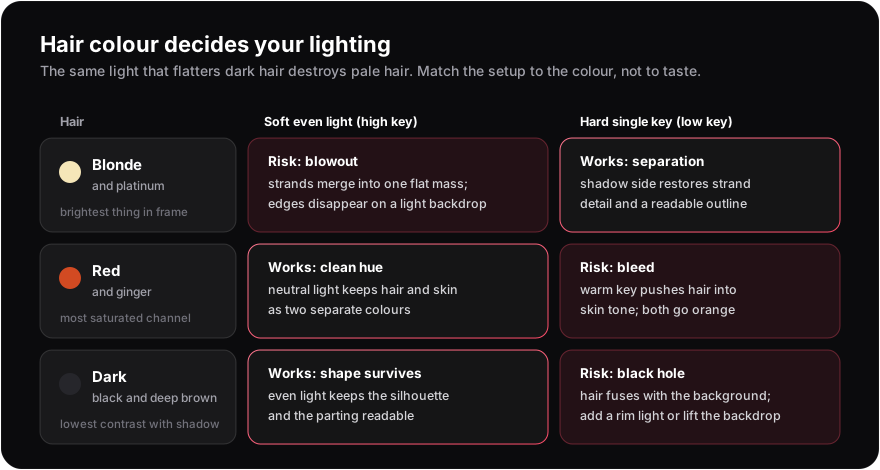 Each hair colour fails differently under each setup.
The test: two hair colours, two setups, one seed each
Same pose wording, same outfit, same style, fixed seed per character. The only difference between the left and right frame of each row is the lighting clause — soft even frontal light on a light backdrop, versus a single hard key light on a dark one.
Blonde, soft light: bright and clean, but the hair reads as one mass of value. Against a pale background the outer edge of the hair nearly disappears — you can see where the silhouette should be more than you can see it.
Blonde, hard key: the strands come back. A dark backdrop gives the hair an edge to end at, and the shadow side of the head restores the separation between individual locks and the face.
White hair, soft light: the strongest version of the same failure. White hair against a light grey backdrop is two near-identical values touching each other; the hair melts into the background at every edge.
White hair, hard key: immediately legible. Same character, same seed, and the difference is entirely the backdrop and key.
The pattern is consistent and it is the opposite of the instinct most people have, which is to light a pale-haired character brightly because the character is bright.
Prompt clauses that produce each setup
| Clause | What you get | Use for |
|---|---|---|
| soft even frontal light, high key | Flat, bright, no strong shadow | Dark hair; clean catalogue-style portraits |
| single hard key light from the left, deep shadows | One directional source, strong falloff | Pale hair; drama; texture in armour and fabric |
| rim light from behind, dark background | Bright outline, dark interior | Dark hair on dark backgrounds — the fix for fusing |
| warm tungsten light | Everything shifts amber | Mood; avoid with red hair unless you want the bleed |
| overcast flat daylight | Soft, neutral, shadowless | Neutral colour reference; safest default |
| neon reflections, wet surfaces | Coloured light from several directions | Setting cue as much as lighting cue |
Red hair, and an honest note about why there is no frame for it
Red and ginger hair have the most saturated channel of any common hair colour, which makes them behave predictably: under neutral light, hair and skin stay two separate colours; under a warm key, both drift toward the same orange and the character starts to look sunburnt. The fix is a neutral or cool key, and a background that is not also warm.
I intended to include a test row for it and dropped it. Two different red-haired references from the catalogue rendered with faces that read as noticeably young — both characters are canonically teenagers in their source material, and the model reproduced that. This blog is deliberately PG-13 and has no age gate, so those frames were not publishable, and substituting a third reference for the sake of a nice grid was not worth it. The advice above stands on the colour physics; the frame is missing and I would rather say why than quietly ship a two-row grid labelled as three.
The mirror image of this is build: the attribute a prompt can move, and the one that drifts on its own — see holding a body type across scenes.
Practical routine
Lighting a character portrait by hair colour
- 1
Pick the reference for its hair, not the prompt
Hair colour is anchored. Choose the character whose hair you want before you write anything.
- 2
Set the backdrop value opposite to the hair
Pale hair on a darker backdrop, dark hair on a lighter one. This single choice does more than any lighting adjective.
- 3
Add one directional source, not three
Name one key light and its direction. Multiple named sources compete and average out — the same dilution that ruins long prompts.
- 4
For dark hair on a dark backdrop, add a rim light
It is the only reliable way to keep the silhouette when the values are close.
- 5
Keep the light clause identical across a set
Lighting changes apparent age and palette, both of which read as identity. Vary it deliberately, never incidentally.
- 6
Judge at thumbnail size
If the hair silhouette is unreadable small, the lighting is wrong regardless of how good the full-size frame looks.
Lighting is also one of the attributes the 6-scene consistency test stresses on purpose — its hard-lighting scene exists precisely because a changed key light restyles hair and shifts palette more than people expect.
Frequently asked questions
Put the hair against a darker backdrop and use one directional key rather than flat frontal light. Pale hair needs a shadow side to keep individual strands readable.
Because white hair and a light backdrop are nearly the same value, so the edge between them vanishes. Darken the backdrop or add a rim light.
Usually not, when identity is anchored to a reference. In our test a request for a blonde bob and green eyes on a brown-haired, red-eyed character was ignored completely. Pick a different reference instead.
Even light on a lighter backdrop, or a rim light from behind if the background is dark. Under a single hard key on a dark background, dark hair fuses with the background.
A warm key light pushes both hair and skin toward the same hue. Use a neutral or cool key and avoid a warm background if you want the hair to read as a separate colour.
No. Multiple named sources compete and average into something you did not ask for. One key light plus, if needed, one rim light is the practical maximum.
Light it for the hair you have
Pick the reference, set the backdrop value, name one key.
Open the generator