To keep the same AI character in different clothes, anchor identity to a reference image, copy the previous setup, change only the outfit, preserve signature accessories and compare at a fixed seed. The face moves because an image generator redraws the whole frame rather than editing only the garment; the new silhouette and colour palette can pull face geometry with them.
Five-step checklist:
- Start from the same fictional-character reference.
- Copy the last successful setup instead of rewriting it.
- Change only the outfit field or clause.
- Restate signature accessories that must survive the swap.
- Compare with a fixed seed, then release the seed for the final batch.
What identity drift is
Identity drift is when the same character comes back visibly different after you change something unrelated to their appearance. It is not a bug and it is not the model forgetting — it is the direct consequence of how generation works. There is no stored character; there is a description, a reference, and a fresh roll of the dice every time.
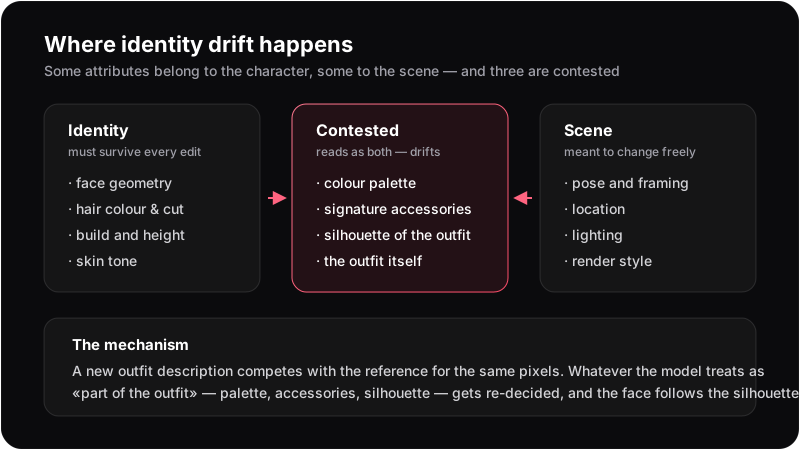 Identity attributes, scene attributes, and the three contested ones in between.
The attributes that move, ranked by how much they hurt
Face geometry
The most damaging and the most sensitive. Eye spacing, jaw width, nose bridge, the distance from brow to hairline — none of these are stated in your prompt, so they are inferred every run from everything else you said. Viewers detect a two-percent change in face proportion instantly, which is why one drifted face ruins a set that is otherwise fine.
Hair
Colour usually holds, because it is normally in the prompt in words. Length, parting and the exact shape of a braid usually do not, because they rarely are. Hair also physically interacts with clothing: add a hood, a scarf or a high collar and the model must decide where the hair goes — and "decide" means "re-draw".
Silhouette and build
Shoulder width, height, body proportion. Clothing is the main input here, which is exactly the problem: a parka implies a broader frame, a fitted dress implies a narrower one, and the model obliges. This is the mechanism behind the single most confusing symptom — the face follows the silhouette. Change the outline of the body enough and the head gets re-proportioned to sit believably on it.
Colour palette
Characters read as themselves partly through colour. Swap a purple-and- gold outfit for plain white and blue, and the whole image regrades: lighting warmth shifts, the eyes often pull toward the new dominant colour, and the character feels like a cousin rather than herself, even when the geometry survived.
Signature accessories
Tiaras, visors, earrings, a hair ornament. These sit in the ambiguous zone: are they part of who she is, or part of what she is wearing? If your new outfit description does not mention them, the model is free to read "new outfit" as "no accessories" and drop them — and losing a signature ornament costs more recognisability than losing a whole garment.
The outfit as identity
For many characters the clothes are the identity — a cleric's armour, a canonical kimono, a signature red jacket. Ask for something else and you have not changed a variable; you have partially deleted the subject. Expect the largest drift here, and expect it to be worst on characters whose look is most distinctive.
The evidence: one seed, one pose, three outfits
To isolate the effect, the three frames below hold constant everything a
generator lets you hold: the same character reference, the same pose
wording, the same requested backdrop, the same style and the same fixed
seed (610944). The only edit between them is the outfit clause.
Test setup last checked 24 August 2026.
Four things happened, and every one of them is a drift pattern rather than a one-off:
- The plain t-shirt was not plain. The request was "a plain white cotton t-shirt". What came back has gold embroidery at the collar and gold trim on the sleeves — the character's ornament vocabulary bled into a garment that was specified as having none. Identity does not just resist replacement; it colonises whatever you put on instead.
- The necklace and bracelets vanished; the tiara stayed. Accessories are not treated as one layer. Each is independently re-decided, and the ones physically closer to the replaced garment are the ones you lose.
- The parka was layered over the dress, not swapped for it. Asked for a winter parka, the model kept the royal dress underneath and put the coat on top. A canonical outfit tends to survive as a base layer even when you meant to replace it.
- The palette went with the outfit. The casual frame lost almost all of the teal-and-gold scheme, and that single change is what makes it read as a different person at thumbnail size — even though the face is nearly identical to the baseline.
Compare your own runs in this order: first the face at full size, then the hair shape, then the accessories, then the palette. The useful question is not "did anything change" — something always changes — but which layer changed first. Palette and accessories drifting is normal and cheap to correct. Face geometry drifting means identity was never anchored, and no amount of prompt wording will rescue it.
One more finding from the same run, worth its own warning: the backdrop was specified as a plain neutral grey studio in all three frames, and two of the three came back with ornate architecture instead. The character's own strong associations overrode an explicit scene instruction. When you are diagnosing drift, verify that the things you asked to stay constant actually did.
The stray word that becomes an object
An earlier version of this test used the pose wording "facing the camera directly" — standard photography phrasing. The generator rendered a camera. Not a viewpoint: an actual camera, held in her hands, in frame, in most outputs of the run.
The negative prompt for that run explicitly listed camera. It lost,
because a negative prompt cannot cancel something the positive prompt is
asking for. Rewording the pose to "looking at the viewer" removed the
prop instantly — no negative prompt needed.
The general rule: every noun in your prompt is a candidate object, including nouns you meant as camera directions or as figures of speech. When something inexplicable keeps appearing, re-read your prompt for the word that is summoning it before you reach for the negative list.
Why clothes specifically
Four reasons an outfit edit is unusually destructive compared to, say, changing the location:
- Garment words carry more than fabric. "Business suit" implies an age, a posture, a lighting convention and a body type. Those implications land on the character, not just the clothes.
- Clothing occupies the majority of the frame. The larger the region you re-specify, the more of the image gets re-decided around it.
- Clothing determines framing. A detailed outfit pulls the camera back to show it; a portrait crop cuts it. Change the crop and the face is rendered at a different scale — a different face, in practice.
- Clothing and identity genuinely overlap. Unlike a location, an outfit can be a constitutive part of the character, so the model cannot cleanly separate the two.
Holding identity while changing clothes
The checklist works because it separates identity from the scene. The reference carries face, hair and build outside the outfit wording. Copying the previous setup prevents a quiet second edit such as changing “neutral grey studio” to “plain grey studio.” Naming a tiara, visor or hair ornament removes the ambiguity between identity and clothing. A fixed seed makes the diagnosis comparable; it does not preserve identity by itself. If one failure keeps returning, add that failure to a standing negative prompt after checking that the positive prompt is not summoning it.
The full multi-scene version of this workflow — outfits, poses and locations across a whole series — is in the guide on consistent AI characters across scenes. If you want to grade a generator on drift systematically rather than by eye, use the 6-scene consistency test. And if the face holds while the set still looks wrong, the problem is one of the seven other attributes in character consistency is not face consistency. And if you are wondering why drift matters commercially: every re-roll it causes shows up in your cost per keeper.
Change the clothes, keep the character
Anchor identity to a reference, then edit one thing at a time.
Open the generatorWhat you cannot fix
Some drift is structural and no workflow removes it:
- Extreme silhouette changes will move proportions. Armour to a swimsuit to a parka is three different bodies; expect to spend attempts there no matter how you prompt.
- Style swaps re-decide faces by definition. Anime and semi-realistic do not share a face grammar, so a style change is always a new face, drawn to resemble the old one.
- The generator has no memory between runs. Consistency is something you re-establish every time with the same inputs, not something the tool remembers for you.
Knowing which category a failure is in tells you whether to keep prompting or to accept the frame and move on — which, in practice, saves more attempts than any wording trick.
Frequently asked questions
Because the generator regenerates the entire image rather than editing the clothes. Face geometry is inferred from your whole prompt, so a new outfit description changes the inputs that produce the face — especially through the body silhouette it implies.
Use the same reference, copy the last successful setup, change only the outfit field, and restate any signature accessories that must remain.
Identity drift is when the same character comes back visibly different after an unrelated edit. It affects face geometry, hair, build, palette and accessories, in roughly that order of damage.
No. A fixed seed makes two runs comparable so you can see what your edit did, but it does not preserve identity across a changed prompt. Anchoring to a reference does that.
Usually because a noun in your prompt is being read as a thing rather than as a direction. 'Facing the camera' can produce an actual camera. A negative prompt cannot cancel what the positive prompt requests — reword the positive side instead.
Get the outfit right first, then vary pose and location. Outfits change the silhouette and the framing, which disturbs identity far more than a pose change does.