"Which AI art generator is best?" has no answer, which is why every article that promises one is really answering a different question. There are five workflows, they solve different problems, and picking the wrong one costs you weeks. Here is the decision tree, with the trade-off each path actually charges you.
Start from the job, not the tool
The question that sorts everything: how many times do you need this character to come back? Once, a handful of times, or dozens. That single number eliminates three of the five options immediately.
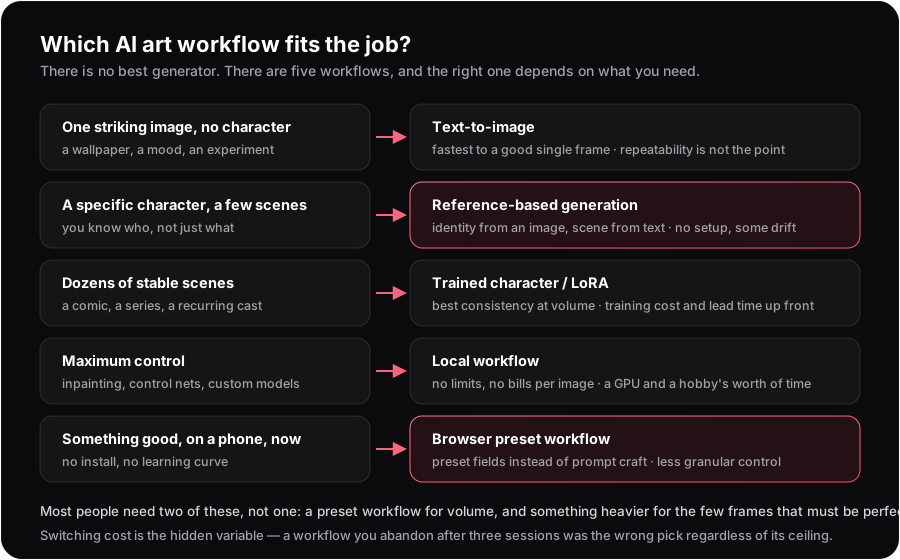 Five situations, five workflows, and what each one charges you.
Text-to-image: one image, no continuity
You want a wallpaper, a mood board frame, a visual idea. Nobody in the image needs to exist again tomorrow.
Type a prompt, take the best of a few rolls, done. This is the only case where "just describe it" is genuinely the right method — and the case where prompt craft pays off most, because the prompt is your only instrument. Everything the other four workflows add is machinery for repeatability you do not need.
What it charges you: nothing, until you want the same character twice. Then you discover that a text description is not an identity, and every re-roll is a new person.
Reference-based: a specific character, a few scenes
You know who, not just what. A character you have in mind, in five or ten situations.
Here identity comes from an image and the scene comes from text, which splits the problem the way it actually divides: the reference holds the face and build while your words move the pose, outfit and setting. Setup is zero — pick or upload a reference and go — and the drift you get is manageable and diagnosable rather than total.
What it charges you: some drift, especially in the attributes an image does not pin. Outfit changes are the usual trigger, which is identity drift, and the attributes to watch are in character consistency is not face consistency.
Trained character or LoRA: dozens of matching scenes
You are making a comic, a series, or anything with a recurring cast where frame 40 must match frame 1.
Training a character model front-loads the work: you gather images, train, and afterwards every generation starts from a model that already knows the character. Consistency at volume is genuinely better than anything a single reference can do — this is the honest ceiling of the reference approach, and where it gets beaten.
What it charges you: setup and lead time before your first usable frame, plus a rigidity that cuts both ways — a trained character resists the changes you want as firmly as the ones you don't. If your project is five images, training is a poor trade. At fifty, it is the obvious one.
Local workflow: maximum control
You want inpainting, control nets, custom checkpoints, and no content policy but your own.
A local setup is strictly more capable than any hosted product, and it is free per image once you own the hardware. Nothing else lets you fix one hand without re-rolling the frame.
What it charges you: a capable GPU, an install that will break at some point, and the willingness to treat the tooling as a hobby in itself. Most people who choose this path for capability abandon it for friction — and that abandonment is the real cost, not the setup afternoon.
Browser preset workflow: something good, on a phone, now
You want a good image in the next two minutes, on the device in your hand, without learning prompt syntax.
Preset fields — pose, clothes, location, style — replace prompt craft with choices, which is a worse instrument for unusual ideas and a much better one for the ordinary ones. On a phone it is the only workflow that is actually pleasant.
What it charges you: granularity. Presets cover the common cases by design, so the further your idea is from common, the more you will want a free-text field — which is why serious preset tools keep one.
Choosing between two that both fit
When two paths look equally good, these tiebreakers decide it:
| If you care most about | Pick | Because |
|---|---|---|
| Time to first usable image | Preset or reference | Zero setup; you are generating within a minute |
| Character matching across many frames | Trained character | Only training holds identity across dozens of scenes |
| Fixing one detail without re-rolling | Local | Inpainting is the capability hosted tools rarely expose |
| Cost at low volume | Preset or reference | No hardware, no training run, pay per image |
| Cost at very high volume | Local | Free per image once the hardware is bought |
| Working on a phone | Preset | The only path that does not assume a desktop |
Notice that no row says "the best tool". Every row is a job, and three of these six rows point away from a hosted product entirely. A vendor telling you their workflow wins all six is telling you about their incentives.
The mistake almost everyone makes
Choosing for the ceiling instead of the floor. People pick the most capable workflow they can imagine mastering, then use it four times and stop, because the friction is paid every session while the capability is only used occasionally.
The better heuristic: pick the lightest workflow that can do the job you actually have this month, and escalate when it visibly fails. Escalating is cheap and reversible. Recovering three abandoned weekends is not.
If your job is "a specific character in a series of scenes, starting today", the reference path is the lightest thing that works, and the cost per keeper arithmetic will tell you when it stops being enough.
Start with the lightest path that works
A reference, a scene, a result — then escalate only if you must.
Open the generatorFrequently asked questions
Start from how many times the character must reappear. Once: text-to-image. A handful of scenes: reference-based generation. Dozens: a trained character or LoRA. Maximum control: a local workflow. Fast on a phone: a browser preset workflow.
For a few scenes, yes — no setup and no lead time. For dozens of scenes that must match precisely, a trained model is better, and that is the honest ceiling of the reference approach.
When you need inpainting, control nets or custom models, generate at high volume, and are willing to treat the tooling as a hobby. The usual failure is abandoning it for friction rather than lacking capability.
Most people should. A light preset or reference workflow handles volume, and a heavier one handles the few frames that must be perfect. The two do not conflict.
Text-to-image derives everything from words, so identity is re-invented on every run. Reference-based generation takes identity from an image and only the scene from words, which is what makes the same character reappear.
A browser-based preset workflow. It needs no install, replaces prompt syntax with choices, and is the only path designed for a touchscreen — at the cost of fine-grained control.