Cost per usable image = total generation cost ÷ usable results. If a pack costs $12, produces 60 images and only 6 meet your pre-written keeper standard, each attempt costs $0.20 but each usable image costs $2.00. That second number is the honest comparison: it includes every failed attempt, not just the output you kept. We call it cost per keeper.
What cost per keeper means
Cost per keeper is the price of one image you would actually use, after paying for every failed attempt that came before it. Where price per image measures the vendor's unit of billing, cost per keeper measures your unit of value.
Cost per keeper = generation cost × attempts / usable results
Three inputs, each of which you can observe:
- Generation cost — the sticker price. Published, easy, and the only one most comparisons use.
- Attempts — how many generations you spent before something worked. This is where tools differ by an order of magnitude.
- Usable results — how many of those outputs you would actually keep. With batch generation a single run can produce more than one.
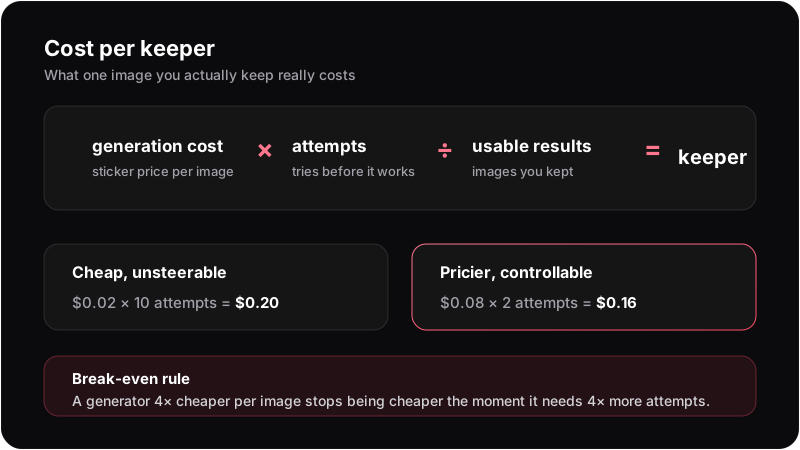 Sticker price is one of three variables — and not the one that varies most.
Cost per usable image calculator
Enter totals from one fixed test. Values stay in your browser and are never sent with analytics events.
Add a total cost, at least one generated image and at least one keeper. Keepers cannot exceed generated images.
Why price per image misleads
A pricing page can only quote the input you buy. It cannot quote how well the tool listens, and listening is what determines the attempts multiplier.
Consider two tools with a 4× price gap: $0.02 and $0.08 per image. At one attempt each, the cheap one obviously wins. But attempts are not equal. Text-only generators re-roll the entire image every time — change "red coat" to "blue coat" and the face changes too, so a near-miss cannot be nudged, only re-rolled. A reference-based workflow keeps identity fixed and lets you change one variable at a time, which turns a near-miss into a small correction instead of a fresh lottery ticket.
Run the arithmetic at 10 attempts versus 2:
| Cheap and unsteerable | Pricier and controllable | |
|---|---|---|
| Price per image | $0.02 | $0.08 |
| Attempts to one keeper | 10 | 2 |
| Usable results | 1 | 1 |
| Cost per keeper | $0.20 | $0.16 |
| Your time | 10 waits, 10 decisions | 2 waits, 2 decisions |
The ranking flipped, and it flipped on a variable that neither pricing page mentions. That gives a rule worth remembering: a generator 4× cheaper per image stops being cheaper the moment it needs 4× more attempts. Substitute your own numbers — the structure holds for any price gap.
Measure your own attempts ratio
Published attempt counts are worthless, including ours: your hit rate depends on what you generate. What is worth doing is measuring your own, once, on a brief you actually care about.
How to measure cost per keeper in 20 minutes
- 1
Write one brief and freeze it
A specific character, outfit, pose and setting — not 'a cool portrait'. Vague briefs have high hit rates everywhere and prove nothing. Write it down so it does not drift between tools.
- 2
Set a keeper standard before you start
Decide in advance what counts: correct face, intact hands, right outfit, no wrong-anatomy artifacts. Judging after the fact makes you generous with whichever tool you already like.
- 3
Generate until you get one keeper, counting attempts
In each tool, work the way you normally would — refine prompts, use negative prompts, use batches — and count every generation spent, including the ones inside a batch.
- 4
Do it three times per tool, on three different briefs
One run measures luck. Three runs on different briefs show whether a tool is broadly steerable or just good at one thing.
- 5
Multiply out and compare
Price per image × attempts ÷ keepers, per tool. Then add the number no formula contains: how long the winning run actually took you.
Here is why step two matters more than it looks. The batch below is four outputs from one brief: "standing on a stone ledge, looking over her shoulder at the viewer, full body", in jungle temple ruins.
Score that batch against a strict standard — the pose as written, plus clean hands — and it contains zero keepers: not one of the four is on a ledge looking over her shoulder, and two have visibly wrong hands. Relax the standard to "a good image of the right character in the right outfit and setting" and the same batch contains two. Same four images, same cost, and a keeper rate anywhere from 0/4 to 2/4 depending on a decision I made in my own head.
That is the whole reason to write the standard down first. A keeper rate you define after seeing the outputs is not a measurement, it is a mood — and it will flatter whichever tool you were already rooting for.
What actually moves the attempts number
Four things dominate, and none of them appear on a pricing page:
- Reference vs description. Describing a face in words re-rolls it every time. Anchoring it to a reference image holds identity steady while you change everything else.
- One variable at a time. If changing the outfit also changes the face, you cannot converge — you can only re-roll. This is identity drift, and it is the single biggest attempt multiplier.
- Negative prompts. A standing list of what you never want kills a recurring class of failures permanently instead of per-generation. See negative prompts.
- Batching. Four outputs per run raise the odds that one lands, so attempts-per-keeper falls even though generations-per-run rises.
The fastest way to cut attempts is to stop re-rolling blind: the diagnostic guide to bad generations maps each symptom to the one input worth changing.
Fewer attempts, by design
Lock identity to a reference, then change one thing at a time.
Open the generatorTest a workflow, not a marketing claim
Gensomnia is free to start, so you can run one of your own briefs and put the observed attempts and keepers into the calculator. A reference-first workflow is designed to let you change one variable without rebuilding the identity, but whether that improves your keeper rate is a measurement — not a saving we can honestly promise in advance.
Before you pay anything, it is worth knowing what the free tiers in this category actually give you — usually less than the word implies, as this breakdown shows.
What the metric doesn't capture
Cost per keeper is a sharper tool than price per image, not a complete one. Three honest limits:
- It ignores your time. Ten cheap attempts and two expensive ones can cost the same in money and nothing like the same in life. Track minutes alongside the money.
- It is brief-specific. A generator can be efficient at generic portraits and hopeless at a named character in a specific outfit. Measure on what you actually make.
- It says nothing about ceiling. A tool with a great attempts ratio that never produces an image you love loses to an expensive one that does. Cost per keeper compares paths to a standard; it cannot compare standards.
Use it the way you would use any unit-economics number: to kill the comparison that was obviously wrong, not to settle taste. And before you trust anyone else's numbers, run them past the review-auditing checklist — a price without a date and a claim without outputs are not data.
Frequently asked questions
The cost of one AI image you actually keep, including every failed attempt: generation cost × attempts ÷ usable results. It prices the outcome instead of the button press.
Fix one specific brief, define what counts as usable before you start, then count how many generations each tool needs to produce one keeper. Multiply that count by the price per image.
Because attempts scale with how little control you have. Text-only generators re-roll the whole image on every edit, so near-misses cannot be corrected — only regenerated, each time at full price.
It depends entirely on the brief. Generic prompts land quickly everywhere; a specific character in a specific outfit and setting is where tools separate. Measure your own on three real briefs.
Often yes. A batch costs its size in generations but can yield more than one usable result, and it converges faster than re-rolling singles — both of which reduce attempts per keeper.